 cutroom.
Long recordings in. Captioned clips out.
Cutroom is a free, open-source video studio that runs on your own computer. It transcribes your recordings, helps you find the moments worth posting, frames and captions them, then exports the files or posts them to your own YouTube and TikTok accounts.
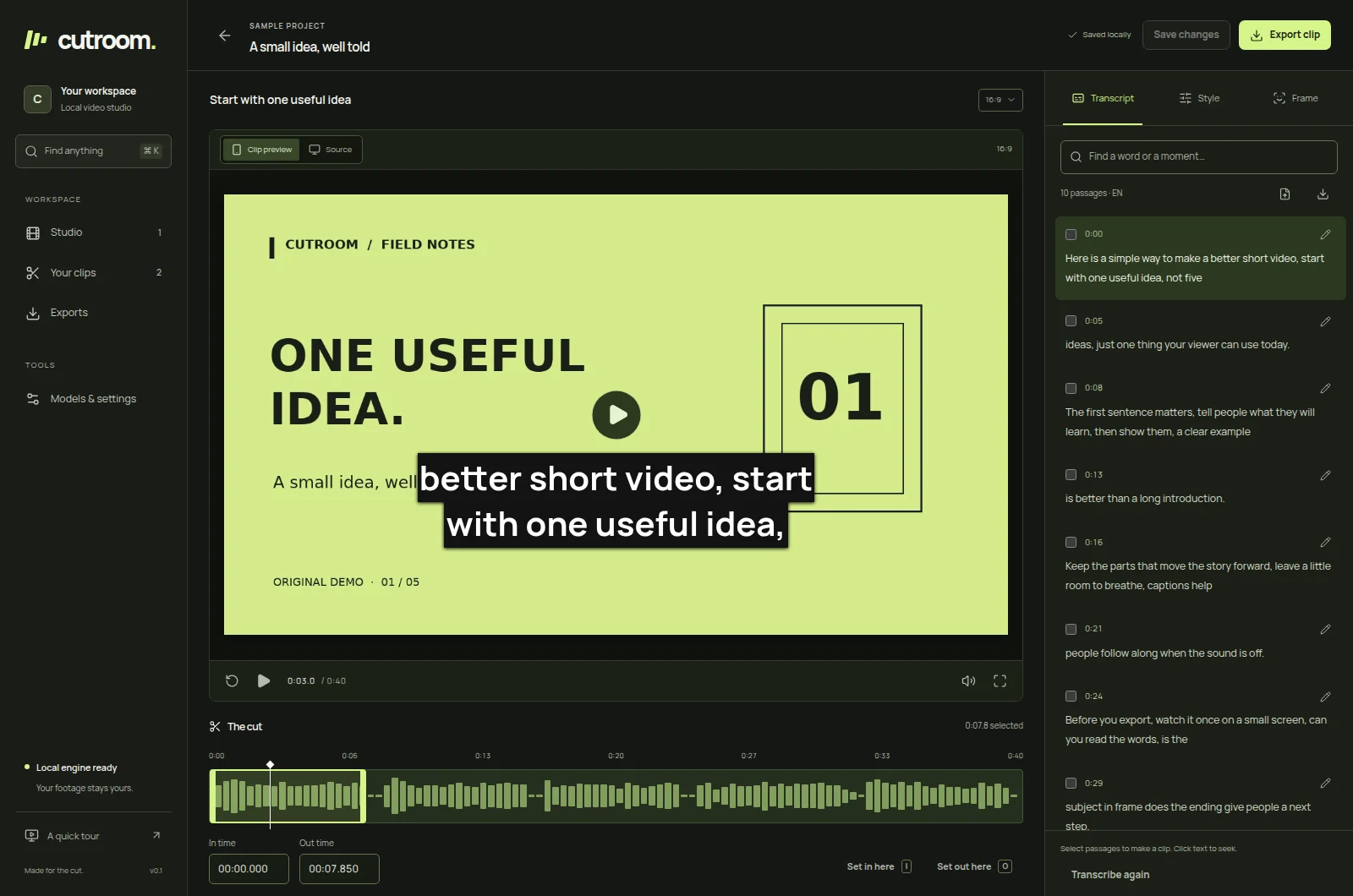
From a two-hour stream to short clips
Every step runs on your computer unless you choose a cloud service for it. You can stop after any step and edit by hand.
- Import
Bring the recording
Open a local file, or paste a finished YouTube replay. Long streams are split into one-hour projects.
- Transcribe
Turn speech into text
Whisper runs locally, on an NVIDIA GPU when one is available, and produces editable text with word timings.
- Review
Find the moments
A local model, your own API key, or your own Claude Code sign-in proposes clips and scores them from the transcript.
- Frame
Make it vertical
Clips are reframed to 9:16, captioned in the style you pick, and rendered as 1080×1920 MP4.
- Post
Publish or export
Save the files, or upload them to the YouTube and TikTok accounts you connected.
How posting to YouTube and TikTok works
You connect your own accounts from Cutroom's Settings page. Sign-in happens on Google's and TikTok's own pages, and the connection is stored on your computer. Cutroom has no server of its own: uploads travel directly from your computer to the platform.
Nothing is posted until you choose the accounts for a run and confirm publishing. You can disconnect an account at any time.
- YouTube
- Asks for
youtube.uploadto upload your clips as Shorts, andyoutube.readonlyto show which channel is connected. Titles, descriptions and tags are the ones you approved in Cutroom. - TikTok
- Asks for
user.info.basicto show the connected account,video.uploadto send a clip to your TikTok inbox as a draft you finish in the TikTok app, andvideo.publishto post directly when you choose that. - Where your sign-in lives
- In a file only your user account can read, inside Cutroom's data folder on your computer. It is never sent to the Cutroom project or anyone else.
What stays on your computer
Cutroom has no accounts, analytics or advertising. The details are in the privacy policy.
- Your footageImported videos, previews and exports stay in Cutroom's local data folder.
- TranscriptsSpeech recognition runs on your machine. Text leaves it only if you pick a cloud reviewer and confirm.
- Platform connectionsYouTube and TikTok tokens are stored locally and used only to upload what you approve.
- The sourceCutroom is MIT-licensed. Every request it makes is in the public code on GitHub.